
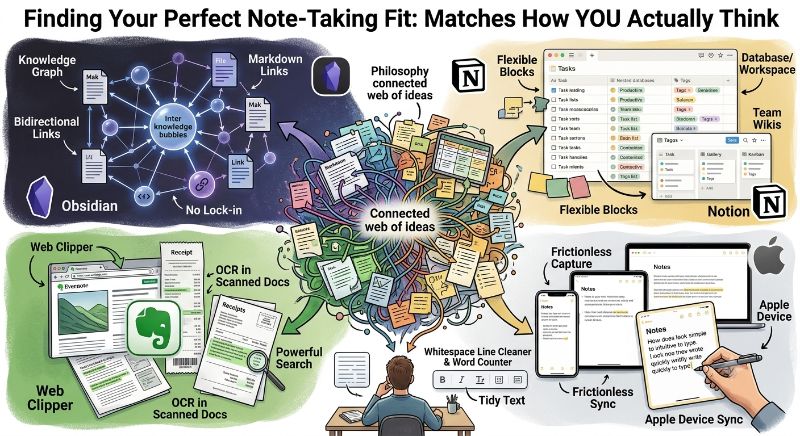

The Best Note-Taking App is That Fits How You Actually Think
Everyone’s tried at least three note-taking apps looking for the one that finally sticks, and the reason so many fail isn’t the app’s fault — it’s a mismatch between the app’s philosophy and how the person actually organizes ideas in their head. Obsidian, Notion, Evernote, and Apple Notes represent four genuinely different approaches to the same basic problem, and picking based on popularity rather than fit is the most common reason people bounce between apps every few months.
Obsidian
Best for: Building a connected web of linked ideas
- Local markdown files you fully own, with no vendor lock-in
- Bidirectional linking turns your notes into a navigable knowledge graph
- Extensive plugin ecosystem for customizing nearly every feature
Obsidian is built around the idea that your best insights come from connecting notes to each other, not just filing them away in folders. The linking system takes some upfront investment to use well, but for people doing deep research or long-term writing projects, that connected structure pays off in ways a flat folder system never quite manages to replicate.
Notion
Best for: Combining notes with databases, tasks, and planning
- Flexible blocks and databases can model almost any workflow
- Strong for teams sharing docs, wikis, and project trackers together
- Steeper learning curve than simpler, single-purpose note apps
Notion isn’t really a note-taking app in the traditional sense — it’s a flexible workspace that happens to handle notes well alongside tasks, databases, and planning. That flexibility is exactly why teams gravitate toward it, but individuals who just want to jot something down quickly sometimes find the blank-canvas setup gets in the way more than it helps.
Evernote
Best for: Capturing and searching web clips and documents
- Strong web clipper for saving articles and pages directly into notes
- Powerful search, including text recognition inside scanned documents and images
- Long track record as one of the original note-taking apps
Evernote earned its reputation years ago as the app for people who wanted to save everything and find it again later, and that core strength hasn’t really gone away. Its search, including the ability to find text inside a photographed document or scanned receipt, remains genuinely useful for anyone whose notes include a lot of clipped web content or physical paperwork.
Apple Notes
Best for: Simplicity and seamless Apple device syncing
- Built into every Apple device with no setup required
- Fast to open and jot something down without friction
- Fewer organizational features than dedicated note apps
Apple Notes wins on friction, not features. Because it’s already installed and syncs instantly across an iPhone, iPad, and Mac, it’s often the app people actually use for quick capture — even when they’ve paid for something more powerful — simply because it’s one tap away with zero setup required.
Cleaning up notes before you share them
Whichever app you land on, notes eventually get copied somewhere else — into an email, a document, or a blog draft. Pasted text often carries over odd formatting, extra line breaks, or inconsistent capitalization from wherever it originated. A free Whitespace Line Cleaner and Word Counter make it quick to tidy up a note before it goes anywhere public, without manually hunting for stray spaces or checking length by eye.
Matching the app to your actual habits
If you tend to write long-form and want your past notes to surface connections you didn’t consciously plan, Obsidian’s linking system rewards that habit over time. If your notes are really project plans and task lists in disguise, Notion’s databases will serve you better than a plain notes app ever could. If you save a lot of articles and documents you’ll need to search later, Evernote’s clipper and search remain hard to beat. And if you mostly need somewhere fast to jot a thought before it disappears, Apple Notes’ zero-friction design wins simply by being frictionless.
It’s fine to use more than one
A lot of people land on a two-app system rather than a single winner — Apple Notes or a similar quick-capture app for fleeting thoughts, paired with Obsidian or Notion for anything that needs real structure later on. Trying to force one app to do both jobs is often where the frustration that sends people app-hunting again actually comes from in the first place.
Final Recommendation
Want a connected, ownable knowledge base? Obsidian. Need notes combined with tasks and databases? Notion. Save a lot of web content and documents? Evernote. Just want frictionless quick capture on Apple devices? Apple Notes.
Leave a Reply